DocuNet™ Services

Enterprise Network
Documentation

A layered methodology for producing living network documentation — the architectural visualization needed to design, operate, troubleshoot, and maintain control of hybrid cloud and premises infrastructure. Built across decades of mentoring Fortune 100 teams toward an enduring documentation capability integrated with change control — not a one-time deliverable, but a permanent organizational competency.

Your infrastructure is growing. Your documentation isn't.

Tribal Knowledge & The Saturation Problem

In a team of 100 technologists, one or two carry the critical architecture knowledge — and they're saturated. Everyone depends on them. Meanwhile, junior staff spend years learning through osmosis, logging in and looking around in futility, waiting for the senior engineer who's too busy to explain it again. When those key people leave, the organization loses its understanding of its own systems entirely.

Fragmented Diagrams

Dozens of Visio files, Lucidchart links, and whiteboard photos scattered across teams. No single authoritative source. No version control. No layered view.

Troubleshooting Blind Spots

Without current documentation, mean-time-to-resolution increases. Change control breaks down. You can't fix what you can't see.
Executive Visibility Gap

Leadership can't assess risk, approve investment, or evaluate compliance without architecture diagrams they can actually understand.


Not just diagrams. A system for keeping them alive.

DocuNet is a methodology — not a one-off drawing effort. It combines structured discovery with a layered documentation approach and an operating model for keeping everything current as the network evolves. The goal is mentoring your team toward owning this capability permanently — so documentation stays current long after the engagement ends.

01

Discovery & Architecture Capture

We work directly with your engineers to gather detailed architecture information and validate physical and logical connectivity across all environments — cloud, on-premises, and hybrid.

02

Layout & Layered Drafting

Using the DocuNet layered approach, we produce diagrams that separate physical topology, logical connectivity, application flow, and security zones into organized, navigable layers.

03

Review & Validation

Diagrams are walked through with your technology teams to confirm accuracy, identify gaps, and ensure every group — network, security, applications, operations — can use the same documentation set.

04

Update & Refinement Model

DocuNet is designed for ongoing maintenance. Expansion, re-architecture, and change control are reflected through a defined update process — documentation stays current, not archived.

Documentation as a training system — not just a reference.

One of the most valuable outcomes of living network documentation is what it does for every new hire who walks through the door.

The Osmosis Problem

Most organizations onboard new technologists the same way: hand them credentials and let them figure it out. They log in, look around, and spend months — sometimes years — building a mental model of the architecture through trial, error, and hallway conversations with the one senior engineer who already has no time to spare.

The Scientific Blueprint

With DocuNet, a new team member sits down with layered architecture documentation on day one. Physical topology, logical connectivity, application flows, security zones — the entire environment laid out as a scientific blueprint. They can trace a packet from source to destination on paper before they ever touch a keyboard. The years of osmosis compress into weeks of structured understanding.

Unsaturate Your Senior Staff

When the documentation teaches, your key technologists don't have to. The one or two senior engineers who carry the institutional knowledge — the ones who are saturated and can't take on one more question — are freed to work on the problems only they can solve. New hires stop being a burden on the people who are already at capacity.

Working on Problems, Not Guessing at Architecture

The difference is immediate. Instead of logging in and looking around in futility, new technologists begin working on real problems guided by the same scientific blueprint the senior staff uses. They contribute faster, make fewer mistakes, and build competence from an accurate foundation rather than inherited assumptions.

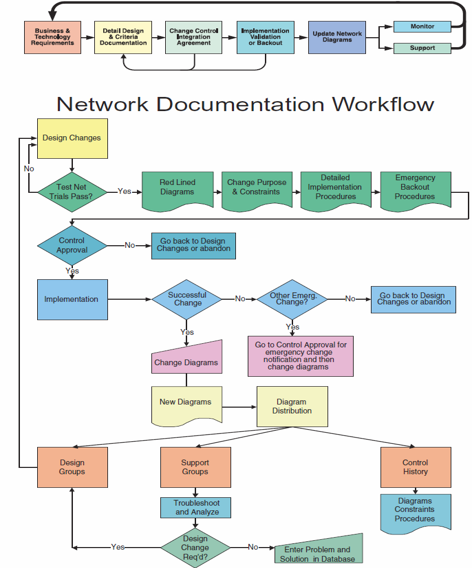
From design change to distributed diagrams — every step tracked.

The DocuNet workflow integrates directly into change control. Design changes flow through redlining, approval, implementation, and diagram distribution — with emergency backout procedures at every decision point.

DocuNet Network Documentation Workflow — flowchart showing change control from design through redlining, approval, implementation, and diagram distribution

Tangible documentation artifacts — not slide decks about documentation.

Layered Network Architecture Diagrams

Detailed, vendor-independent diagrams using the DocuNet layered format. Physical topology, logical connectivity, application flows, and security boundaries — all in one navigable system.

Enterprise-Wide Visualization

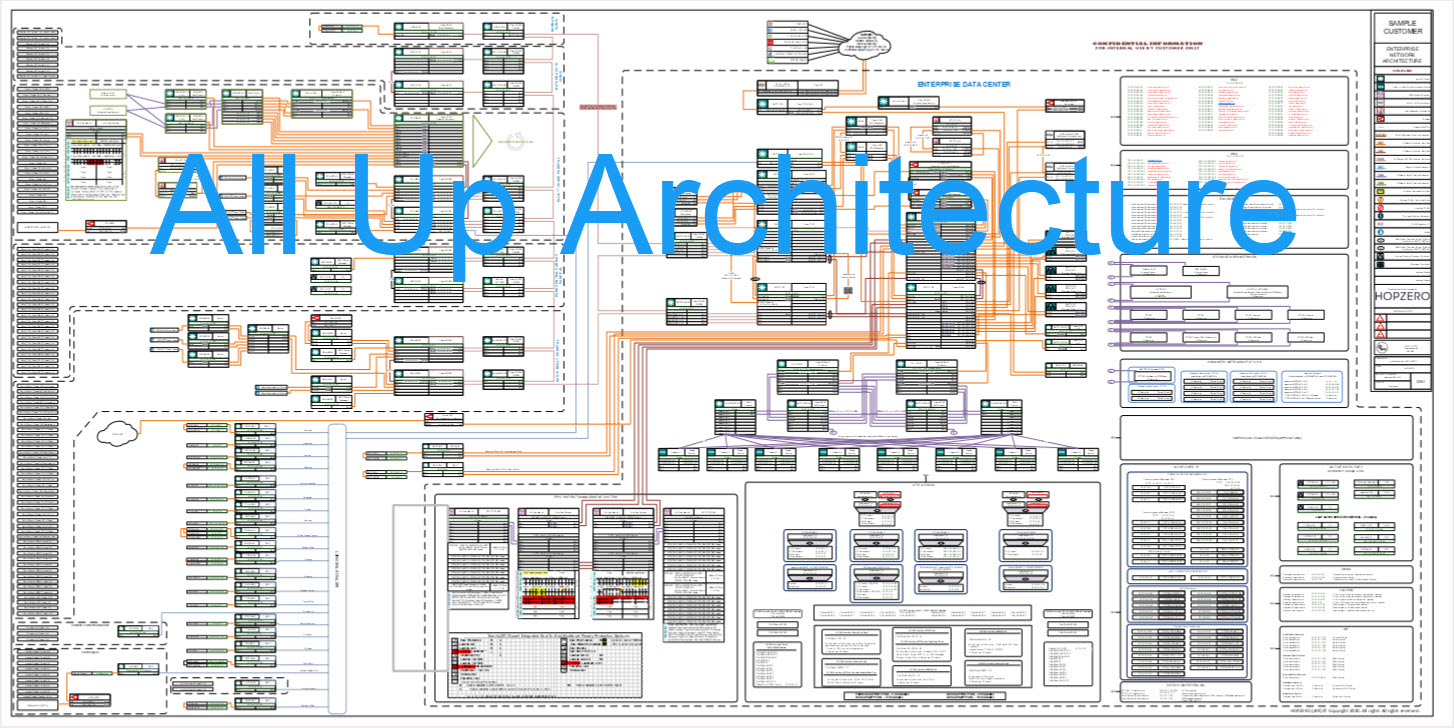
Large-format outputs giving teams the ability to see entire enterprise infrastructure on a single diagram. Supports architecture review sessions, war rooms, and executive briefings.

Training & Enablement Workshop (OPTIONAL)

Structured workshop to teach your team documentation principles, the DocuNet layered methodology, and change control processes.

Redline & As-Built Change Control (OPTIONAL)

A process for managing diagram updates through redlines and as-built documentation — tracking what changed, when, and why.

Architecture layers — from all-up to wire closet.

Click through to drill down from the enterprise-wide view into progressively detailed infrastructure layers. This is how DocuNet organizes architecture — each level reveals specifics without losing context.

All-Up Architecture — enterprise-wide infrastructure overview
Level 1: All-Up Architecture — Enterprise-wide view showing the complete infrastructure topology, from perimeter through core to endpoints.
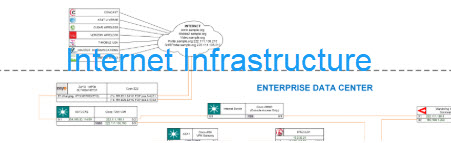
Internet Infrastructure — enterprise data center connectivity
Level 2: Internet Infrastructure — Internet-facing components, enterprise data center connectivity, and external service boundaries.
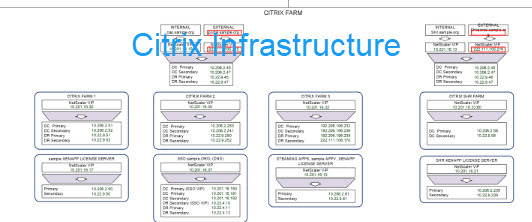
Citrix Systems — Citrix farm infrastructure
Level 3: Citrix Systems — Citrix farm infrastructure including application delivery, session management, and backend connectivity.
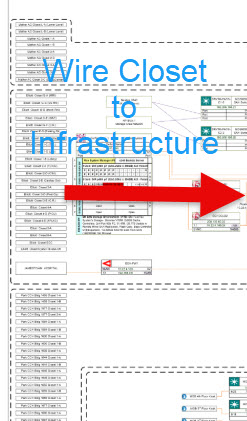
Wire Closet to Data Center — physical layer diagram
Level 4: Wire Closet to Data Center — Physical layer detail from wire closet switch stacks through distribution to data center core.
1 / 4

11 principles that keep enterprise documentation accurate and useful.

These principles are distilled from decades of enterprise network documentation engagements. They define what separates living documentation from stale Visio files collecting dust on a file share.

01

Consolidate into a Common Drawing

Multiple separate drawings, charts, and tables maintained by different analysts are combined onto a common drawing that details both WAN and campus LAN networks. One drawing, one truth.

02

Show Physical and Logical Architecture

The drawing clearly shows both the physical and logical architecture in a standardized, schematic format — not a marketing poster, not a whiteboard sketch.

03

Enable End-to-End Traceroute on Paper

The drawing supports the ability to trace the route between any two devices on the enterprise network. If you can’t follow a packet from source to destination on the diagram, the documentation is incomplete.

04

Layer the Information

The drawing is layered — separate layers for the physical network, each protocol, VLANs, mission-critical applications, and more. This permits printing a drawing without IP addresses, for example, to hand to a vendor or partner without exposing internal detail.

05

Print at E-Size for Readability

An E-size (34″ × 44″) drawing is recommended. Enterprise architecture compressed onto letter-size paper is unreadable and unusable during an outage.

06

Distribute Widely — Mount and Display

Copies should be mounted on foam core and displayed in server rooms, Network Management and Operations Centers, and conference rooms. Documentation that lives only on a file server doesn’t get used. Diagrams placed in public or shared areas are printed with sensitive layers redacted — IP addresses, security zone details, and filter configurations removed — so the architecture is visible without exposing internal detail to vendors, visitors, or unauthorized staff.

07

One Set of Documentation for All Groups

All operational groups use the same documentation set — WAN, LAN, Server, and Database teams. No separate “network view” vs. “server view” that inevitably diverge.

08

Version Control with Check-Out / Check-In

Each analyst receives a copy. A check-out / check-in method ensures everyone works from the current version and maintains security over the documentation set.

09

Maintain a High-Level Overview

A separate high-level drawing provides the 32,000-foot view of the network without all the detail — for executive briefings, board presentations, and audit walkthroughs.

10

Validate Quarterly — Documentation Decays Immediately

Network documentation goes out of date within minutes of being printed. A reasonable enterprise strategy is quarterly validation using automated tools to detect undocumented changes between cycles.

11

Integrate with Change Control

Documentation is incorporated directly into the change control system through a defined workflow:

  1. The proposing group redlines the drawing with the proposed change.
  2. Redlined drawings are printed and distributed to all affected groups for review.
  3. After approval, the redlined drawing is given to the implementation team to execute.
  4. After implementation, redlines are changed to black and new drawings are plotted.

Using this procedure, all documentation is kept current — all of the time. Include any information that would assist in troubleshooting an outage or poor performance, using tables for complex data like router filter settings.

Building enduring documentation capability — by industry.

Bill has personally mentored teams at Fortune 100 companies across these industries toward a permanent documentation capability integrated with change control. The engagement doesn't end with a diagram delivery — it ends when the organization owns the methodology, maintains it independently, and never loses architectural visibility again.

Financial Services & Banking

Fortune 100 retirement and insurance carriers, investment banks, and financial holding companies. Mentored their network teams to build and maintain layered documentation across trading floors, branch networks, and compliance-governed infrastructure — integrated directly into their change control process.

Healthcare & Medical Research

Major cancer research centers, VA medical facilities, and state health agencies. Helped clinical and IT teams establish enduring documentation practices across campus networks with HIPAA-governed systems, research data flows, and multi-facility connectivity.

Medical Devices

Fortune 100 FDA-regulated device manufacturers with global R&D, manufacturing, and distribution networks. Built documentation capability that satisfied quality system validation requirements and gave engineering teams architectural visibility across continents.

Technology & Semiconductor

Fortune 100 storage infrastructure vendors and semiconductor fabrication operations. Mentored data center and facilities teams toward self-sustaining documentation across high-density environments and cleanroom network segments — with change control that tracked every modification.

Energy & Oil / Gas

Major petroleum services companies with geographically distributed operations. Established documentation practices spanning SCADA connectivity, campus-to-field architectures, and remote site infrastructure — giving operations teams visibility they'd never had before.

Public Transportation

Metropolitan transit authorities and state turnpike commissions. Built documentation and change control capability across fare collection systems, operations centers, and distributed station infrastructure where outage visibility directly affects public safety.

State & Federal Government

State data centers, federal medical systems, and transportation agencies. Mentored government IT teams toward documentation practices that satisfy inter-agency security requirements and survive staff turnover — the single biggest threat to institutional knowledge.

Start where you are.

Getting Started Package

For organizations that have staff but not the documentation expertise. Evaluate current docs. Build initial diagrams. Train your team on principles and maintenance.

Training Only

For teams with capacity but needing methodology. 5-day workshop covering DocuNet methodology, layered approach, change control, and practice with your actual infrastructure.

Request a Consultation Starts with a scoping call to understand your environment and documentation needs.

What DocuNet delivers.

Features

  • Layered Architecture Approach
  • Vendor Independent
  • Living Documentation Model
  • One Set of Diagrams for All Teams
  • Cloud + Premises + Hybrid Coverage

Benefits

  • Faster Troubleshooting
  • Reduced Tribal Knowledge Risk
  • Executive & Board Visibility
  • Stronger Change Control
  • Audit & Compliance Readiness

Is your infrastructure a candidate for DocuNet?

Download the free DocuNet Readiness Assessment — a quick self-evaluation to determine how much value structured documentation would bring to your organization.

Download Assessment (PDF)

Your team deserves the capability
to document what they build.

Whether you need a full DocuNet engagement or a training workshop to build internal capability, the goal is the same: mentoring your technologists toward an enduring documentation practice integrated with change control. It starts with a conversation about where you are and where you need to be.